Watch golf on TV and you'll see it on almost every tee shot: a bright line that climbs off the clubface, arcs across the sky and drops towards the green. A golf shot tracer turns a white dot you can barely follow into a flight you can see, and it makes any golf clip look ten times better.
You don't need broadcast equipment to put one on your own swings. A golf shot tracer app on your phone can draw the ball's flight over any clip. Here's how a phone ball tracer works, and how to film so it looks right.
How a golf shot tracer app works
On TV, a tracer is driven by cameras and tracking systems built for the job. A phone app works differently: it draws the flight over your video from a handful of points. Where the ball was struck, how high it went and where it came down are enough to draw a believable curve between them.
That means it's worth being clear about what a phone shot tracer is. It's a picture of your shot, drawn where you tell it the ball went. It isn't a launch monitor, and it doesn't measure your ball speed or spin. What it does brilliantly is show the shape of a shot, and make a clip worth sharing.
How to film for a golf ball tracer
A good tracer starts with the right clip:
- Film down the line, from behind you, so the ball flies away from the camera. That's the view TV uses, and the flight stays in the picture far longer than it does face on.
- Leave plenty of sky above your head. If the top of the flight is out of the picture, the tracer has to guess where it went.
- Keep filming until the ball lands. A driver can hang in the air for around six seconds; stop too soon and you'll lose the landing.
- Hold the phone still if you can. A tripod makes the tracer's job easiest, though a handheld clip can still work.
There's more on camera position and height in how to film your golf swing with your phone.
Adding a shot tracer to a video in Golf Studio
Golf Studio is a free golf shot tracer app for iPhone. Open a clip in the editor, tap Trace it and choose Shot tracer. The tracer is built in a few short steps:
- Impact. Scrub to the moment the club meets the ball and drag the marker onto the ball. Or let the phone watch the ball and draw the flight for you.
- Peak. Move to the top of the flight and drag the marker onto the ball. If the ball left the top of the picture, push the marker off the top.
- Landing. Move to where the ball came down and mark it there.
- Shape. Drag two handles to bend the flight into the shot you actually hit, whether a draw, a fade or a high cut.
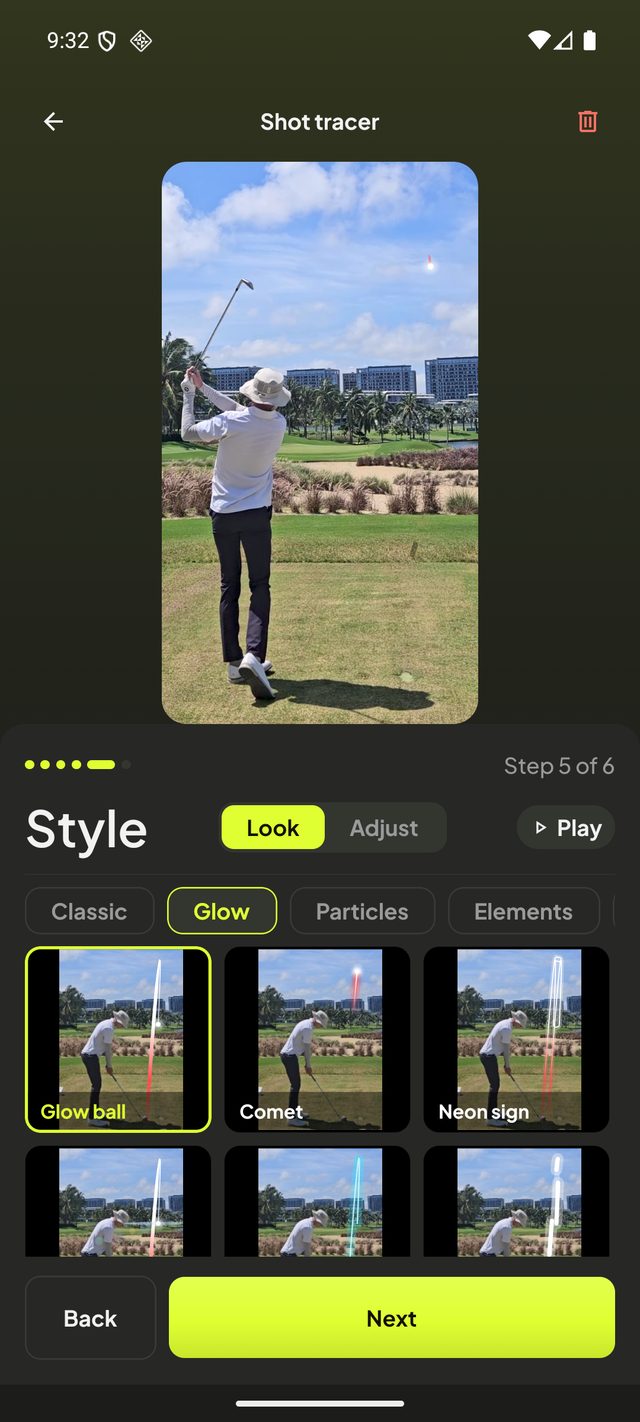
- Style. Choose how the line looks.
- Yardage. Add how far the ball went, if you like, as a badge that can count up as the ball flies and ride along beside it.
If you filmed handheld, Golf Studio follows the camera's movement so the line stays on the course rather than sliding with the picture. Filmed on a stand? Tick Filmed on a tripod and it keeps the line exactly where you put it.
Pick a shot tracer look
The classic tracer is a clean line, and it's hard to beat. But the Style step has 27 looks to choose from, grouped as Classic, Glow, Particles, Elements and Colour & FX: a glowing ball at the head of the line, a comet, a neon tube, sparkling stardust, even a rocket trail. Tap Play to watch each one on your own shot before you choose.
A few tips for a tracer that looks right:
- Match the colour to the sky. Bright red and yellow stand out against blue; white and lime work well against grey cloud.
- Keep it believable. A flight that climbs steadily and falls more steeply than it rose looks real, because that's how a golf ball flies.
- Watch the timing. The line should leave the clubface at the strike, not before it, and reach the ground as the ball does.
Club tracer, too
A shot tracer shows where the ball went. A club tracer shows how it got there. In Golf Studio you can mark your swing position by position, from setup to finish, and the path of the clubhead is drawn as a line of light, one colour going back and another coming down. Put the two together and one clip shows both your swing path and your ball flight. Add your swing tempo and it shows your rhythm as well.
Share your traced golf videos
When it's done, export the clip in portrait for Instagram, TikTok and YouTube Shorts, with music, a scorecard for the hole, slow motion around the strike or a sound on impact. And because every swing goes into your journal, the traced version sits alongside the original, ready to compare with next month's.
Golf Studio is free on the App Store for iPhone, with every feature included, and an Android version is on the way.